
7 Best Procurement Automation Tools for Finance and Ops Teams
Publish Date
Jun 2, 2026

Procurement automation tools digitize purchasing workflows from intake to payment. They route POs, onboard suppliers, match invoices, and sync supplier data across finance systems.
The goal is to cut cycle times, reduce maverick spend, and free finance teams from manual approval chasing.
Some platforms target the Fortune 500 with deep ERP integration. Others serve mid-market teams that need clean workflows without a six-month rollout.
A growing category sits outside software entirely: managed services that deliver procurement outcomes. This ranking covers seven options across those categories.
Key data point
Hackett Group research shows top-quartile procurement orgs process POs at roughly a third the cost of average peers. The gap comes largely from automation and self-service intake. See the Hackett Group benchmarks.
Key terms
Purchase order (PO): A formal buyer document authorizing a supplier to deliver goods or services at agreed terms. It anchors the procure-to-pay cycle.
3-way match: An automated check comparing the purchase order, goods receipt, and supplier invoice. Payment only releases when all three agree.
Supplier master: The system-of-record dataset for vendor identity, banking, tax, and compliance details. Clean data prevents payment fraud and duplicate vendor records.
Intake-to-procure: A workflow pattern capturing every purchase request through one front door. It routes requests to approvers based on category, amount, and policy.
Procure-to-pay (P2P): The full transactional cycle from requisition to supplier payment, covering approvals, PO issuance, receiving, and invoice processing.
Source-to-pay (S2P): P2P plus upstream sourcing like RFP management, supplier discovery, and contract negotiation. S2P suits strategic procurement.
Maverick spend: Purchases made outside approved channels, suppliers, or contracts. It's a primary cost leak that automation aims to eliminate.
Human-in-the-loop (HITL): A workflow where automation handles routine steps and routes exceptions to a human reviewer. It balances speed with judgment.
Wrk
Quick summary
Wrk delivers procurement automation as a managed outcome. The team designs, builds, and runs the workflow. Finance leaders get clean POs, onboarded suppliers, and matched invoices.
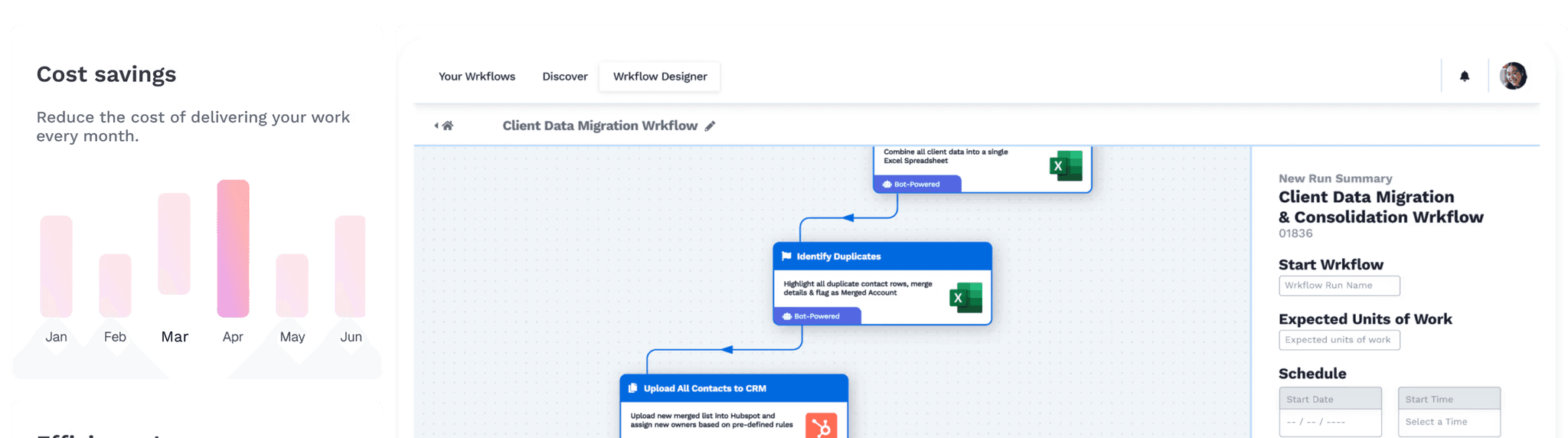
Wrk is a fully managed AI workflow platform combining AI models, RPA, OCR, API connectors, and human-in-the-loop tasks. One managed service handles intake routing, supplier onboarding, PO issuance, and 3-way match. It also syncs supplier data to the ERP.
See the Wrk finance solutions page for use case detail. Wrk runs on 2,500+ pre-built actions and serves 10,000+ users worldwide. Pricing starts at a $1,000 build fee plus $250 monthly in credits.
Key Features
Managed PO routing with approval rules tuned to client policy
Automated vendor onboarding with tax form capture and banking verification
OCR-driven invoice capture and 3-way match against PO and receipt data
Supplier master sync between procurement tools, ERP, and AP systems
Human-in-the-loop review for exceptions and low-confidence matches
2,500+ pre-built actions for ERP, email, e-signature, and bank integrations
SOC 2 Type II, HIPAA, and PIPEDA compliance
Outcome-based service with workflow design and maintenance included
Who should choose Wrk
Finance leaders who want a managed result, not another platform
Teams without dedicated procurement ops headcount
Companies needing automation across procurement, AP, and contracts
Pro tip
When scoping a managed procurement workflow, list exception types first. Volume of clean transactions matters less than how messy edge cases get handled.
Coupa
Quick summary
Coupa is an enterprise procure-to-pay suite with strong spend analytics. It's a market leader for large organizations needing a unified BSM platform.
Coupa combines sourcing, contracts, procurement, invoicing, expenses, and treasury in one platform. Its community-driven spend intelligence benchmarks prices from aggregated data. It earns recognition in Gartner's procure-to-pay suite category.
Coupa is built for organizations with mature procurement functions and dedicated admins. Implementation runs several months and benefits from a systems integrator.
Key Features
Unified procure-to-pay and source-to-pay in one platform
AI spend classification and supplier risk scoring
Community benchmarks for price and supplier performance
Multi-round RFP and reverse-auction sourcing
Contract lifecycle management with clause libraries
Treasury and payments for global disbursement
ERP connectors for SAP, Oracle, NetSuite, and Workday
Who should choose Coupa
Enterprises with dedicated procurement, IT, and admin resources
Organizations needing one platform across sourcing, P2P, and treasury
Teams valuing benchmarks and supplier risk scoring
Coupa vs Wrk
Coupa is a platform requiring configuration, admins, and ongoing operation. Wrk is a managed service that delivers the outcome without the overhead.
Coupa fits enterprises ready to invest in procurement as a function. Wrk fits teams that want the result without staffing it.
Attribute | Coupa | Wrk |
Model | SaaS platform | Managed service |
Implementation | 3-9 months typical | Weeks, scoped per workflow |
Internal admin needed | Yes, dedicated | None, Wrk operates it |
Pricing model | Annual license, usage tiers | $1,000 build + $250/mo credits |
Best fit company size | Enterprise (1,000+) | SMB to mid-market |
Sourcing modules | Deep, mature | Custom built per client |
Exception handling | Workflow rules | Human-in-the-loop included |
Compliance | SOC 2, ISO 27001 | SOC 2 Type II, HIPAA, PIPEDA |
SAP Ariba
Quick summary
SAP Ariba is the large-enterprise sourcing and procurement standard. It offers deep SAP ERP integration and a supplier network spanning millions of buyers and sellers.
Ariba runs full source-to-pay for many of the world's largest companies. The Ariba Network is the dominant B2B trading network, simplifying supplier discovery. For SAP ECC or S/4HANA shops, it's often the default.
The tradeoff is complexity. Implementations are major IT projects, and the UX reflects enterprise heritage rather than modern intake design.
Key Features
Source-to-pay coverage from sourcing through payment
Ariba Network for supplier discovery and document exchange
Native integration with SAP ECC and S/4HANA
Guided buying interface for preferred suppliers
Contract management with clause libraries and approvals
Supplier risk and performance modules
Global tax and compliance for invoices
Who should choose SAP Ariba
Large enterprises already running SAP
Global organizations needing supplier network reach
Strategic sourcing teams running frequent RFPs
SAP Ariba vs Wrk
Ariba is enterprise infrastructure needing months to deploy and a dedicated team to run. Wrk is a managed service scoped to specific procurement workflows.
Ariba wins on supplier network reach. Wrk wins on speed and operational simplicity for non-enterprise teams.
Attribute | SAP Ariba | Wrk |
Model | Enterprise SaaS suite | Managed service |
Implementation | 6-18 months | Weeks |
ERP fit | SAP-native | ERP-agnostic via connectors |
Supplier network | Ariba Network, millions of vendors | Custom onboarding per client |
Pricing | Enterprise contract, six figures+ | $1,000 build + $250/mo credits |
User experience | Enterprise, configurable | Invisible to most staff |
Internal admins required | Yes, multiple | None |
Key insight
The right tool depends less on features and more on operating model. Platforms reward teams ready to staff procurement. Managed services reward teams that want procurement to run quietly.
Procurify
Quick summary
Procurify is a mid-market procurement and spend management platform with user-friendly PO workflows. It's a popular pick for companies graduating from spreadsheets.
Procurify focuses on the requisition-to-PO cycle with a clean mobile and web interface. It includes budget tracking, virtual cards, and AP automation, making it practical for teams under 500 employees.
It earns strong reviews on G2's procure-to-pay category. It's less deep than Coupa or Ariba on sourcing, but for spend control, that's a feature.
Key Features
Mobile-first requisition and approval workflows
Budget tracking with real-time committed-spend visibility
PunchOut and catalog support for preferred suppliers
Virtual cards for controlled purchasing
AP automation with invoice capture and 2-way match
Integrations with NetSuite, QuickBooks, and Sage Intacct
Vendor management with document tracking
Who should choose Procurify
Mid-market companies replacing spreadsheets and email approvals
Finance teams wanting one tool for PO control and AP
Organizations prioritizing adoption and mobile workflows
Procurify vs Wrk
Procurify is a self-serve platform the finance team configures and runs. Wrk delivers the same outcomes as a managed service.
Procurify suits teams that want to own the tool. Wrk suits teams that want to own the outcome.
Attribute | Procurify | Wrk |
Model | SaaS platform | Managed service |
Implementation | 4-8 weeks | Weeks, scoped per workflow |
Admin overhead | Light, ongoing | None |
Invoice matching | 2-way match standard | 3-way match with HITL exceptions |
Best fit company size | Mid-market (50-500) | SMB to mid-market |
Pricing | Per-user tiered subscription | $1,000 build + $250/mo credits |
Customization | Configurable, in-app | Custom-built workflow |
Zip
Quick summary
Zip is a modern intake-to-procure platform with strong AI. It's purpose-built as the single front door for every purchase request.
Zip's positioning is that procurement starts with intake, not a PO. It routes requests through legal, security, finance, and procurement reviewers, and has grown quickly among tech companies.
Zip integrates with downstream ERP, AP, and contract tools rather than replacing them. That makes it a strong orchestration layer over an existing P2P stack.
Key Features
No-code intake forms that branch by purchase type
Cross-functional approval routing across procurement, legal, IT, and security
AI-assisted request categorization and supplier matching
Integrations with Coupa, NetSuite, Workday, Ironclad, and DocuSign
Vendor management with risk and compliance tracking
Committed-spend dashboards
Native PO creation or PO sync to existing ERP
Who should choose Zip
Tech and high-growth companies with complex cross-functional approvals
Teams wanting intake orchestration over an existing P2P stack
Organizations prioritizing AI-driven request triage
Zip vs Wrk
Zip is a focused intake-to-procure platform companies configure and run. Wrk delivers end-to-end procurement automation as a managed service.
Zip suits teams committed to owning an orchestration layer. Wrk suits teams that don't want to operate any tool.
Attribute | Zip | Wrk |
Model | SaaS intake platform | Managed end-to-end service |
Scope | Intake and orchestration | Intake through invoice match |
Setup time | 4-12 weeks | Weeks per workflow |
Replaces ERP/AP | No, orchestrates them | No, integrates with both |
Admin overhead | Ongoing, internal | None, Wrk operates it |
Pricing | Annual enterprise contract | $1,000 build + $250/mo credits |
Exception handling | Workflow rules and routing | Human-in-the-loop included |
Tipalti
Quick summary
Tipalti is a global mass-payments and AP automation platform with supplier management built in. It's strong for paying many international suppliers or contractors.
Tipalti's strength is the supplier-facing side. It handles self-service onboarding, tax forms in 50+ jurisdictions, and payment in 196 countries.
It also includes PO matching, invoice processing, and 2-way or 3-way match. For cross-border supplier complexity, it's often the anchor tool, pairing well with a procurement platform.
Key Features
Self-service supplier onboarding with tax form capture
Global payments in 196 countries and 120 currencies
Invoice capture with OCR and AI coding
2-way and 3-way match against POs and receipts
Tax compliance for 1099, 1042-S, and global VAT
Fraud detection with sanctions list screening
Integrations with NetSuite, Sage Intacct, QuickBooks, and Xero
Who should choose Tipalti
Companies paying many international suppliers or contractors
Marketplaces and affiliate businesses with high payment volume
Teams needing tax compliance across multiple jurisdictions
Tipalti vs Wrk
Tipalti is a specialist AP and payments platform the finance team configures and runs. Wrk is a managed service covering procurement, onboarding, and invoice match.
Tipalti anchors global payment complexity. Wrk wraps end-to-end managed procurement.
Attribute | Tipalti | Wrk |
Primary focus | Global payments and AP | End-to-end procurement automation |
Model | SaaS platform | Managed service |
Supplier onboarding | Self-service portal | Managed by Wrk, with HITL |
Coverage | AP-heavy, light on intake | Intake through match and sync |
Pricing | Platform fee plus per-payment | $1,000 build + $250/mo credits |
Internal effort | Configure and operate | None, Wrk operates it |
Tax compliance | Built-in, global | Workflow-configurable |
Example
A growing SaaS company runs intake on Zip and pays vendors via Tipalti. Invoice exceptions route through a managed Wrk workflow, with Wrk handling the human glue.
Zapier
Quick summary
Zapier is horizontal automation, useful for stitching procurement tools and email approvals. It's not a procurement platform, but often the first step for small teams.
Zapier connects thousands of apps through trigger-and-action workflows. For lean teams, it can route form requests to Slack approvals and push items to a PO log. It's the lowest-cost entry point to procurement automation.
Limits show up fast with volume, exceptions, and audit needs. Zapier doesn't enforce policy, hold supplier master data, or do 3-way match. It's a starter, not a destination.
Key Features
7,000+ SaaS app integrations
No-code visual workflow builder
Multi-step Zaps with branching and filters
Approval steps via email or Slack
Webhooks and Zapier Tables for light data storage
AI actions for content generation and classification
Affordable pricing for low-volume use cases
Who should choose Zapier
Very small teams piloting procurement automation
Organizations stitching specialist tools lacking native connectors
Simple linear approvals with low transaction volume
Zapier vs Wrk
Zapier is a DIY toolkit someone internal must build and maintain. Wrk is a managed service that designs, runs, and updates the workflow.
Zapier suits the simplest cases at low cost. Wrk suits cases where exceptions, compliance, and reliability matter.
Attribute | Zapier | Wrk |
Model | Self-serve automation | Managed automation service |
Build effort | Internal, ongoing | Wrk builds and maintains |
OCR and document processing | Limited, via add-ons | Built-in IDP capability |
Human-in-the-loop | Not native | Native to platform |
Compliance posture | SOC 2 Type II | SOC 2 Type II, HIPAA, PIPEDA |
Best for volume | Low to moderate | Moderate to high |
Pricing | Per-task subscription | $1,000 build + $250/mo credits |
All 7 procurement automation tools compared
Tool | Model | Best fit | Strongest at | Setup time | Pricing start |
Wrk | Managed service | Teams wanting an outcome, not a tool | End-to-end managed workflow with HITL | Weeks | $1,000 build + $250/mo |
Coupa | Enterprise SaaS | Mature procurement orgs | BSM suite with spend benchmarks | 3-9 months | Enterprise contract |
SAP Ariba | Enterprise SaaS | SAP-anchored enterprises | Supplier network and S2P depth | 6-18 months | Enterprise contract |
Procurify | Mid-market SaaS | Companies leaving spreadsheets | Clean PO workflows and adoption | 4-8 weeks | Per-user subscription |
Zip | Intake SaaS | Tech and high-growth firms | Cross-functional intake orchestration | 4-12 weeks | Annual contract |
Tipalti | AP and payments SaaS | Global payment volume | Supplier onboarding and global pay | 6-12 weeks | Platform + per-payment |
Zapier | Horizontal automation | Smallest teams and stitching | Cheap, simple linear workflows | Days | Per-task subscription |
Related automation areas
Procurement automation rarely lives alone. It shares boundaries with AP processing, contract management, and industry-specific finance workflows. See Wrk's guides on invoice processing automation and automating contract lifecycles.
Property managers have unique vendor mixes covered in Wrk's AP automation guide for property management.
Start here
The first weeks of a procurement automation effort decide whether it sticks. The steps below sequence work so finance leaders see traction before a full rollout.
Map the current cycle. Document intake, approval, PO issuance, receipt, and invoice match with cycle times and exception rates.
Quantify the leak. Identify maverick spend, late-payment penalties, missed discounts, and FTE hours on manual chasing.
Pick one workflow first. Choose the highest-volume or highest-pain process, not the most strategic one.
Decide the operating model. Self-serve platform, managed service, or hybrid. The model drives the shortlist more than features.
Run a scoped pilot. Target measurable outcomes in 30 to 60 days with a clear go or no-go decision.
Frequently Asked Questions
What are procurement automation tools?
Procurement automation tools digitize purchasing workflows. They handle intake requests, PO routing, supplier onboarding, contract storage, invoice matching, and payment approvals.
How does procurement automation differ from AP automation?
Procurement automation covers the upstream cycle from intake to PO and supplier management. AP automation covers the downstream cycle from invoice receipt to payment.
What is a 3-way match?
A 3-way match compares the PO, the goods receipt, and the supplier invoice before payment. If all three agree, the invoice clears in seconds instead of days.
Do procurement automation tools replace an ERP?
No. Procurement tools sit alongside an ERP and feed it clean PO, supplier, and invoice data. The ERP remains the system of record.
What's the typical ROI timeframe?
Most mid-market teams see payback within 6 to 12 months. Savings come from reduced maverick spend, faster cycle times, early-payment discounts, and lower manual headcount.
Can small finance teams adopt procurement automation?
Yes. Managed services and mid-market platforms now make it accessible without a dedicated procurement team. Wrk, Procurify, and Zip serve teams under 200 employees.
What's the difference between source-to-pay and procure-to-pay?
P2P covers requisition through payment. S2P adds upstream sourcing like RFPs, supplier discovery, and contract negotiation. S2P suits strategic procurement teams.
Next step
Finance leaders ready to move past evaluation can scope a managed workflow with Wrk in one call. See the Wrk finance solutions page for how managed automation handles intake, POs, and 3-way match.





