
8 Best Document Processing Automation Platforms
Publish Date
Mar 5, 2026
Document processing automation uses AI, OCR, and machine learning to handle business documents without manual intervention. These tools extract, classify, validate, and route data from invoices, contracts, and forms. The output is structured data that feeds directly into ERP, CRM, and accounting systems.
The intelligent document processing market reached $2.8 billion in 2025, growing at a 35% compound annual rate. Organizations that implement IDP report ROI within 6 to 12 months through reduced processing costs and faster turnaround times.
We’ve tested and evaluated six document automation tools across accuracy, integration depth, ease of deployment, and total cost of ownership. This ranked list covers managed platforms, enterprise suites, and self-service tools to match different team sizes and complexity levels.
Key Terms
Document Processing Automation: The end-to-end workflow of capturing, extracting, validating, and routing document data using software instead of manual labor. It covers everything from intake to system integration.
Intelligent Document Processing (IDP): A category of software that combines OCR, NLP, and machine learning to understand document structure and context. IDP goes beyond basic text recognition to classify documents and extract specific data fields.
Optical Character Recognition (OCR): Technology that converts images of printed or handwritten text into machine-readable characters. OCR is the foundational layer most document automation platforms build upon.
Human-in-the-Loop (HITL): A workflow design where human reviewers validate or correct AI-extracted data before it enters downstream systems. HITL improves accuracy and creates training data that helps AI models improve over time.
Straight-Through Processing (STP): The percentage of documents processed end-to-end without any human review or intervention. Higher STP rates indicate more mature and accurate automation.
Template-Free Extraction: AI-powered data extraction that recognizes document layouts without needing preconfigured templates for each format. This approach handles new vendor invoices or unfamiliar forms without manual setup.
Robotic Process Automation (RPA): Software bots that mimic human interactions with digital systems, such as clicking buttons, copying data, and navigating applications. RPA is often paired with IDP to create end-to-end automated document workflows.
Key Insight
Organizations using IDP reduce document processing time by up to 93% and cut operational costs by 62%, according to industry benchmarks. The gap between manual and automated processing widens as volume increases.
Wrk
Quick Summary
Wrk is a fully managed automation platform that combines AI, RPA, OCR, API connectors, and human-in-the-loop tasks into unified workflows. It’s the best option for teams that want document automation built and maintained for them.
Wrk takes a fundamentally different approach to document processing automation. Wrk designs, builds, runs, and maintains automated document workflows as a managed service. Teams don’t have to figure out a self-service tool on their own.
In our experience, this model eliminates the biggest friction point in document automation: implementation. Most platforms require weeks or months of configuration, training, and integration work. Wrk delivers custom workflows with a one-time setup fee starting at $1,000.
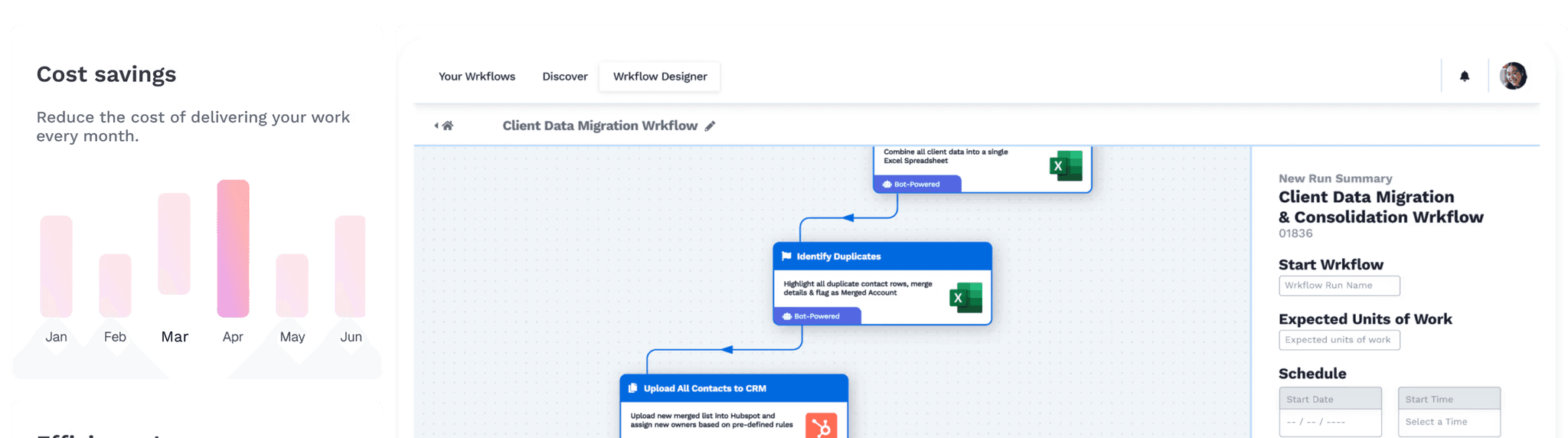
Wrk’s hybrid technology stack is what makes it uniquely flexible. The platform stitches together AI, robotic process automation, OCR, API connectors, and human-in-the-loop steps into a single orchestrated workflow.
A single workflow can extract data with AI, validate it against a CRM via API, and route exceptions to a human reviewer. All of that runs within one automated process, not separate tools bolted together.
The platform processes invoices, tax receipts, contracts, employee onboarding documents, and identity verification files. Penny Appeal automated the generation of over 200,000 tax receipts using Wrk’s document automation. MainMicro saves thousands of hours monthly with Wrk’s OCR and AI for accounts payable.
Key Features
Managed automation service with workflows built and maintained by Wrk’s team, no internal specialists required
Hybrid orchestration combining AI, RPA, OCR, API connectors, and human-in-the-loop in a single workflow
Vision-driven RPA that interacts with legacy systems, web apps, desktop software, and remote sessions where APIs don’t exist
Consumption-based pricing with no minimum volume commitments
SOC 2 Type II, HIPAA, and PIPEDA compliant with full encryption and audit logs
2,500+ pre-built bots and connectors for rapid workflow assembly
Integrations with Salesforce, Slack, Microsoft 365, Stripe, and custom systems
Who Should Choose Wrk
Operations teams that need document automation deployed fast without hiring RPA developers or IDP specialists
Mid-market companies processing invoices, onboarding documents, or compliance forms across multiple legacy systems
Organizations that want a single vendor handling AI extraction, system integration, and exception handling in one managed workflow
Floowed
Quick Summary
Floowed is a purpose-built IDP platform for financial services, lending, and insurance document types. Its AI models are trained specifically on complex financial documents, achieving 96-99% field-level accuracy on bank statements, loan packages, KYC documents, and insurance claims, including handwritten content and variable formats.
Floowed's strength is the combination of high financial document accuracy with operations team ownership. The no-code Flows builder lets operations teams configure extraction pipelines, validation rules, confidence thresholds, exception routing, and approval sequences without IT or developer involvement. When business rules change, the operations team makes the change directly.
Human review is built in with automatic audit logging of every reviewer action. The exception queue surfaces specific fields the system couldn't process confidently, with the original document alongside extracted data for efficient verification. Every action is logged with user attribution and timestamp for compliance purposes.
Integration with lending systems, banking APIs, CRMs, and downstream databases is API-based with pre-built connectors for common financial services technology. Deployment is measured in days to weeks.
Key Features
96-99% field-level accuracy on financial document types including irregular bank statements and handwritten content
No-code Flows builder for operations team-owned workflow configuration
Built-in human review with automatic audit logging for compliance
API-based integration with pre-built connectors for financial services systems
Flat subscription pricing from $499/month with no per-page fees
Support for multi-format financial documents: bank statements, passbooks, loan packages, KYC, insurance claims
Who Should Choose Floowed
Financial services and lending teams processing complex, variable-format financial documents at scale
Operations teams that need to own workflow configuration without IT dependency
Regulated industries requiring built-in human review with full audit trails
Floowed vs. Wrk
Floowed and Wrk serve different document processing needs. Floowed is a purpose-built IDP platform specializing in financial services document types with deep extraction accuracy on complex financial formats. Wrk is a managed automation service that handles document processing as one component of broader cross-functional workflows.
Floowed's strength is financial document accuracy and operations-owned workflow configuration. Wrk's strength is end-to-end managed automation that eliminates the need for internal specialists. For financial services teams needing the highest accuracy on complex document types, Floowed delivers deeper specialization. For teams needing fast, managed workflow automation across varied document types and legacy systems, Wrk covers more operational ground.
Feature | Floowed | Wrk |
|---|---|---|
Primary Focus | Financial services document processing | End-to-end workflow automation |
Deployment Model | Self-service cloud platform | Fully managed service |
Extraction Accuracy | 96-99% on financial documents | AI + OCR hybrid extraction |
No-Code Configuration | Yes, Flows builder for operations teams | No setup required; Wrk builds it |
Starting Price | $499/month flat subscription | $1,000 one-time setup + consumption |
Per-Page Fees | None | Consumption-based per workflow run |
RPA Capabilities | None | Built-in vision-driven RPA |
Human-in-the-Loop | Yes, with compliance audit logging | Yes, integrated into orchestration |
Legacy System Support | API-based integrations | Native RPA for desktop, web, Citrix |
Compliance | Audit logging with user attribution | SOC 2 Type II, HIPAA, PIPEDA |
ABBYY Vantage
Quick Summary
ABBYY Vantage is a low-code intelligent document processing platform with 150+ pre-trained AI models and deep OCR expertise. It’s built for enterprise teams that want to configure and manage their own document automation using a marketplace of ready-made extraction skills.
ABBYY Vantage is a cloud-first IDP platform built on decades of OCR and content intelligence technology. The platform uses machine learning, NLP, and large language models to classify, extract, and validate data from structured, semi-structured, and unstructured documents.
Vantage’s marketplace offers over 150 pre-trained AI “skills” covering invoices, purchase orders, contracts, tax forms, and identity documents. Teams can also build custom skills using the low-code Skill Designer. Pre-trained models deliver approximately 90% out-of-the-box accuracy, with continuous improvement through human-in-the-loop feedback.
The platform earned the 2024 AI Breakthrough Award for Best Intelligent Document Processing Solution. Leading analyst firms including Gartner, IDC, and Everest Group have recognized ABBYY as a top IDP provider.
Key Features
150+ pre-trained document skills in the ABBYY Marketplace for fast deployment
Low-code/no-code Skill Designer for building custom extraction models
OCR supporting 190+ languages, including handwriting, barcodes, and checkboxes
Built-in connectors for UiPath, Blue Prism, Automation Anywhere, Microsoft Power Automate, and SharePoint
Human-in-the-loop validation with continuous model learning
RAG support for connecting extracted data with generative AI applications
Who Should Choose ABBYY Vantage
Enterprise teams with existing RPA infrastructure that need a dedicated IDP layer plugged into their automation stack
Global organizations processing multilingual documents across 190+ languages
IT departments with citizen developers who can configure and train extraction models without deep technical skills
ABBYY Vantage vs. Wrk
ABBYY Vantage and Wrk serve different automation philosophies. Vantage is a self-service IDP platform where internal teams configure, train, and maintain document extraction skills. Wrk is a managed service where the vendor builds and operates the full workflow.
Vantage excels at deep document extraction with its 150+ pre-trained models and multilingual OCR. Wrk’s strength is end-to-end workflow orchestration that includes system integration, exception routing, and legacy system automation.
For teams without dedicated automation staff, Wrk’s managed approach gets results faster.
Feature | ABBYY Vantage | Wrk |
|---|---|---|
Deployment Model | Self-service, low-code platform | Fully managed service |
Implementation Time | Weeks to months | Under 24 hours for custom workflows |
Pre-Trained Models | 150+ marketplace skills | 2,500+ pre-built bots and connectors |
OCR Languages | 190+ | Multi-language via OCR module |
RPA Capabilities | Requires third-party RPA | Built-in vision-driven RPA |
Human-in-the-Loop | Yes, for validation | Yes, integrated into workflow orchestration |
Pricing Model | Annual subscription, per-page tiers | Consumption-based, pay per workflow run |
Internal Staff Required | Yes, for config and maintenance | No, Wrk’s team handles operations |
Legacy System Support | Via RPA partner integrations | Native RPA for desktop, web, Citrix |
Compliance | SOC 2, GDPR | SOC 2 Type II, HIPAA, PIPEDA |
UiPath Document Understanding
Quick Summary
UiPath Document Understanding is an IDP module built into the UiPath automation platform. It combines OCR, ML, and generative AI for document extraction within broader RPA workflows. It’s the top choice for organizations already invested in the UiPath ecosystem.
UiPath Document Understanding is the intelligent document processing component of the UiPath automation platform. It processes structured, semi-structured, and unstructured documents using a combination of OCR engines, machine learning classifiers, and generative AI extraction.
UiPath earned Leader status in the Everest Group IDP PEAK Matrix 2025 and the IDC MarketScape for IDP Software. Forrester also recognized it in the Document Mining and Analytics Platforms evaluation. The platform’s DocPath LLM enables out-of-the-box extraction for custom document types without traditional model training.
Document Understanding’s biggest advantage is its tight integration with UiPath’s broader automation suite. Document extraction feeds directly into attended and unattended bots that handle downstream processing, approvals, and system updates. For organizations already running UiPath, adding document automation doesn’t require a separate vendor.
Key Features
Generative AI extraction via DocPath LLM for zero-shot processing of new document types
Pre-built models for invoices, receipts, purchase orders, tax forms, and identity documents
Multiple OCR engine support, including UiPath’s own and third-party engines
Tight integration with UiPath Studio, Orchestrator, and Action Center
Autopilot for Studio that creates extraction workflows using plain English prompts
Platform Units consumption model with metered pricing per page processed
Who Should Choose UiPath Document Understanding
Large enterprises with existing UiPath RPA deployments that want to add document processing without a separate vendor
IT teams with RPA developers who can build and manage extraction workflows in UiPath Studio
Organizations processing millions of documents monthly that need enterprise-grade orchestration and audit trails
UiPath Document Understanding vs. Wrk
UiPath and Wrk both combine RPA with document processing, but through opposite delivery models. UiPath is a developer-driven platform where internal teams build, test, and maintain automation workflows. Wrk delivers document automation as a managed service with no internal tooling or developer requirement.
UiPath’s advantage is ecosystem depth: hundreds of activities, community templates, and enterprise features like process mining. Wrk’s advantage is speed and simplicity, with teams getting document workflows running in under a day versus weeks or months with UiPath.
Feature | UiPath Document Understanding | Wrk |
|---|---|---|
Deployment Model | Self-service, developer-driven | Fully managed service |
Implementation Time | Weeks to months | Under 24 hours |
RPA Capabilities | Full RPA suite (attended + unattended) | Built-in vision-driven RPA |
AI/ML Features | DocPath LLM, generative extraction | AI extraction, OCR, generative AI |
Pricing Model | Platform Units + license tiers | Consumption-based, per workflow run |
Internal Staff Required | RPA developers or citizen devs | None |
Human-in-the-Loop | Yes, via Action Center | Yes, built into orchestration |
Free Tier | Community edition (non-commercial) | No free tier, setup from $1,000 |
Analyst Recognition | Leader in Everest, Forrester, IDC | 2025 Global Recognition Award |
Compliance | SOC 2, GDPR, HIPAA (varies) | SOC 2 Type II, HIPAA, PIPEDA |
Rossum
Quick Summary
Rossum is an AI-first IDP platform specializing in transactional document workflows for finance and procurement teams. Its template-free Aurora AI engine and three-way matching make it a strong fit for accounts payable automation at scale.
Rossum is a cloud-native intelligent document processing platform focused on transactional documents like invoices, purchase orders, and receipts. The company raised $100 million in Series A funding from General Catalyst in 2023, bringing total funding to $104 million.
Rossum earned Leader status in the IDC MarketScape for IDP Software 2023-2024. Over 450 organizations use the platform, including Bosch, Siemens, Panasonic, and Flexport.
Rossum’s proprietary Aurora AI engine uses template-free extraction, processing new document layouts without preconfigured templates. The platform’s AI Agents handle complex reasoning tasks within document workflows. A Master Data Hub centralizes business rules for validation and routing.
Key Features
Template-free Aurora AI engine for layout-agnostic extraction across all document types
Three-way matching for purchase orders, invoices, and goods receipts
AI Agents for intelligent reasoning within complex document workflows
Master Data Hub for centralizing business rules and validation logic
Python SDK Suite with production-ready APIs, streaming, and async support
Certified integrations with SAP, Coupa, Workday, Oracle, and NetSuite
276 language support including handwriting recognition
Who Should Choose Rossum
Finance teams processing high volumes of invoices that need three-way matching against POs and receipts
Procurement departments at mid-market to enterprise companies running SAP or Coupa
Organizations with developer resources to take advantage of Rossum’s SDK and API tools
Rossum vs. Wrk
Rossum and Wrk occupy different positions in the document automation market. Rossum is a specialized IDP platform focused on finance and procurement document types, with deep ERP integrations and three-way matching. Wrk is a broader automation platform that handles document processing as one component of cross-functional workflows.
Rossum’s entry price of $18,000 per year suits mature businesses with predictable document volumes. Wrk’s consumption-based model with a $1,000 setup fee offers a lower barrier to entry. Rossum requires internal teams to manage the platform, while Wrk operates as a fully managed service.
Feature | Rossum | Wrk |
|---|---|---|
Primary Focus | Finance and procurement documents | Cross-functional business automation |
Deployment Model | Self-service cloud platform | Fully managed service |
AI Engine | Aurora proprietary AI, template-free | AI + OCR + RPA hybrid orchestration |
Three-Way Matching | Yes, built-in | Available as custom workflow logic |
Starting Price | $18,000/year | $1,000 one-time setup + consumption |
Languages Supported | 276 | Multi-language via OCR module |
ERP Integrations | Certified SAP, Coupa, Workday, Oracle | API connectors + custom integrations |
Internal Staff Required | Yes, for config and management | No |
Legacy System Support | Limited to API/SFTP integrations | Native RPA for desktop, web, Citrix |
Compliance | SOC 2, GDPR | SOC 2 Type II, HIPAA, PIPEDA |
Pro Tip
When evaluating document automation platforms, request a pilot with real production documents, not sample data. Template-free extraction tools perform best on real-world document variety, and pilot results reveal accuracy gaps that demos won’t show.
Docsumo
Quick Summary
Docsumo is an AI-powered document capture platform focused on extracting and validating data from financial documents. It’s well-suited for finance teams that need fast, accurate data extraction from invoices, bank statements, and loan documents without heavy setup.
Docsumo is an intelligent document processing platform that automates data extraction from unstructured documents using OCR and machine learning. The platform specializes in financial document types: invoices, bank statements, tax returns, insurance forms, and rent rolls.
Docsumo’s 40+ pre-trained models handle specific document types out of the box. Teams can train custom models with as few as 10 sample documents.
The platform reports 95%+ straight-through processing rates across its customer base. Users like N.S. Trucking cuts per-document processing time from over 7 minutes to under 30 seconds.
The platform supports multi-channel ingestion through API, email, and cloud drives. It integrates with QuickBooks, Salesforce, SAP, and other systems through direct connectors and API endpoints.
Key Features
40+ pre-trained extraction models for financial and business document types
Custom AI model training with as few as 10 sample documents
Human-in-the-loop review screen with click-to-capture data correction
Multi-channel ingestion via API, email parsing, and cloud storage uploads
Validation rules and external database lookups for automated data checks
SOC 2 and HIPAA compliance options on higher-tier plans
Integrations with QuickBooks, Salesforce, SAP, Google Drive, and Dropbox
Who Should Choose Docsumo
Finance and accounting teams processing invoices, bank statements, or tax returns at moderate to high volume
Lending platforms and insurance companies that need fast extraction from loan applications and claims forms
Small to mid-market businesses looking for a self-service IDP tool with lower setup complexity than enterprise platforms
Docsumo vs. Wrk
Docsumo and Wrk target different buyer profiles. Docsumo is a self-service document capture tool where teams upload documents, review extracted data, and export results. Wrk builds and operates full automation workflows that include extraction as one step in a larger process chain.
Docsumo’s strength is specialized financial document extraction with pre-trained models and fast custom training. Wrk’s strength is end-to-end automation that eliminates manual steps beyond data capture.
For teams that only need extraction, Docsumo works well. For teams needing extraction, validation, routing, and system integration together, Wrk covers more ground.
Feature | Docsumo | Wrk |
|---|---|---|
Primary Focus | Document data extraction/validation | End-to-end workflow automation |
Deployment Model | Self-service cloud platform | Fully managed service |
Pre-Trained Models | 40+ financial/business doc types | 2,500+ bots and connectors |
Custom Model Training | 10 documents minimum | Wrk team handles model config |
Starting Price | Free trial; Growth from $0.30/page | $1,000 one-time setup + consumption |
RPA Capabilities | None | Built-in vision-driven RPA |
Workflow Automation | Basic document routing | Full cross-system orchestration |
Legacy System Support | API/webhook integrations only | Native RPA for desktop, web, Citrix |
Compliance | SOC 2, HIPAA (enterprise tier) | SOC 2 Type II, HIPAA, PIPEDA |
Nanonets
Quick Summary
Nanonets is a no-code AI document processing platform with pay-as-you-go pricing and pre-trained models for 300+ document types. It’s a solid entry point for teams automating their first document workflows without a large upfront investment.
Nanonets is an AI-driven platform that automates data extraction and document workflows using deep learning and OCR. The platform processes invoices, receipts, purchase orders, contracts, insurance claims, and identity documents with pre-trained models covering over 300 document types.
Nanonets is trusted by 34% of Fortune 500 companies and reports up to 90% reduction in manual effort for document-heavy processes. The platform’s no-code workflow builder lets non-technical users configure extraction, validation, and routing without developer support.
In 2025, Nanonets released DocStrange, an open-source Python library with a 7B parameter model for document processing. This hybrid approach offers cloud API access with 10,000 free documents monthly, plus full local processing for privacy-sensitive use cases.
Key Features
300+ pre-trained document models with no-code configuration
Pay-as-you-go pricing starting with $200 in free credits at signup
40+ language support with layout-agnostic AI extraction
Workflow automation builder for multi-step document processing
Open-source DocStrange library for local/hybrid deployment
Integrations with Salesforce, QuickBooks, Google Drive, Zapier, Dropbox, and SharePoint
API-first architecture for embedding extraction into custom applications
Who Should Choose Nanonets
Small businesses and startups automating document processing for the first time with minimal budget
Developer teams that want API-first document extraction embedded into custom applications
Privacy-conscious organizations interested in local/hybrid processing through the open-source DocStrange library
Nanonets vs. Wrk
Nanonets and Wrk serve different ends of the automation spectrum. Nanonets is a self-service extraction tool for teams that want to configure their own document processing at minimal cost. Wrk provides fully managed, end-to-end automation workflows that go beyond extraction into cross-system orchestration.
Nanonets’ pay-as-you-go pricing and free credits make it accessible for small teams testing automation. Wrk’s managed model costs more upfront but eliminates the ongoing burden of operating and maintaining the automation internally. For complex, multi-step workflows spanning multiple systems, Wrk delivers more complete automation.
Unframe
Quick Summary
Unframe is an AI-native enterprise platform that goes beyond traditional IDP by combining document extraction with abstraction, turning unstructured content into decision-ready intelligence. It's built for large enterprises that need to process documents across multiple use cases without template configuration or model training.
Unframe takes a different approach to document processing than most IDP platforms. Rather than focusing solely on data extraction, Unframe's platform abstracts higher-order meaning, context, relationships, and intent from documents, transforming them into structured, actionable knowledge.
The platform processes a wide range of document types, including contracts, invoices, emails, PDFs, sales decks, manuals, and transcripts. Unframe's template-free extraction uses dynamic schema selection, meaning the AI automatically adapts to new document layouts without preconfigured templates or manual setup.
Unframe's modular Blueprint architecture assembles tailored solutions from hundreds of building blocks spanning extraction, automation, agents, and search. Solutions deploy in days rather than months, and the platform runs on any modern LLM without requiring fine-tuning or model training. Notable clients include Cushman & Wakefield, NZZ, and Tarsus Distribution.
Key Features
Template-free extraction with dynamic schema selection that adapts to any document layout automatically
Full pipeline from ingestion through extraction, abstraction, and delivery into downstream systems
AI agents for multi-step workflows that handle complex reasoning within document processes
LLM-agnostic architecture with no model training or fine-tuning required
Deployment options including on-prem, private cloud, or fully managed SaaS
Outcome-based pricing: try a fully operational solution before committing
Enterprise-grade security with data that never leaves the customer's perimeter
Who Should Choose Unframe
Large enterprises processing high volumes of diverse, unstructured documents across multiple departments
Organizations that need document intelligence beyond extraction, including abstraction, reasoning, and cross-document analysis
Teams that want production-ready AI document solutions deployed in days without building internal AI engineering capability
Unframe vs. Wrk
Unframe and Wrk both simplify document automation for teams that don't want to build in-house, but through different models. Unframe is an AI-native platform that focuses on deep document intelligence, turning unstructured content into abstracted, decision-ready knowledge. Wrk is a managed automation service that orchestrates end-to-end workflows combining extraction with RPA, API connectors, and human review.
Unframe's strength is its abstraction layer, going beyond data capture to understand context, relationships, and intent across documents. Wrk's strength is operational workflow orchestration, stitching together multiple automation technologies into a single managed process.
For enterprises needing deep document intelligence and cross-document analysis, Unframe delivers more analytical depth. For teams needing fast, managed workflow automation across legacy systems, Wrk covers more operational ground.
Feature | Unframe | Wrk |
|---|---|---|
Primary Focus | Document intelligence and abstraction | End-to-end workflow automation |
Deployment Model | Managed SaaS, private cloud, or on-prem | Fully managed service |
Implementation Time | Days | Under 24 hours |
Template Requirements | Template-free, dynamic schema selection | 2,500+ pre-built bots and connectors |
AI/ML Approach | LLM-agnostic, no training required | AI + OCR + RPA hybrid orchestration |
RPA Capabilities | AI agents for multi-step workflows | Built-in vision-driven RPA |
Pricing Model | Outcome-based, try before you commit | Consumption-based, per workflow run |
Internal Staff Required | No | No |
Legacy System Support | Unlimited integrations to any system | Native RPA for desktop, web, Citrix |
Compliance | Enterprise-grade, data stays on-prem | SOC 2 Type II, HIPAA, PIPEDA |
Feature | Nanonets | Wrk |
|---|---|---|
Deployment Model | Self-service cloud + open-source | Fully managed service |
Pre-Trained Models | 300+ document types | 2,500+ bots and connectors |
Starting Price | Free $200 credit; pay-as-you-go | $1,000 one-time setup + consumption |
No-Code Setup | Yes, visual workflow builder | No setup required; Wrk builds it |
RPA Capabilities | None | Built-in vision-driven RPA |
Open-Source Option | Yes, DocStrange library | No |
Workflow Depth | Document extraction and routing | Full cross-system orchestration |
Internal Staff Required | Minimal; no-code basics, dev for APIs | None |
Legacy System Support | API/Zapier integrations only | Native RPA for desktop, web, Citrix |
Compliance | SOC 2, GDPR | SOC 2 Type II, HIPAA, PIPEDA |
Full Platform Comparison
This table compares all six document processing automation platforms across the attributes that matter most when evaluating automated document handling tools.
Feature | Wrk | Floowed | ABBYY Vantage | UiPath Doc Understanding | Rossum | Docsumo | Nanonets | Unframe |
|---|---|---|---|---|---|---|---|---|
Deployment | Managed service | Self-service cloud | Self-service cloud | Self-service cloud/on-prem | Cloud | Cloud | Cloud + open-source | Managed SaaS/on-prem |
Setup Time | Under 24 hours | Days to weeks | Weeks to months | Weeks to months | Days to weeks | Days | Hours to days | Days |
Built-In RPA | Yes | No | No (partner integrations) | Yes (full suite) | No | No | No | AI agents |
Human-in-the-Loop | Yes | Yes | Yes | Yes | Yes | Yes | Yes | Yes |
Pre-Trained Models | 2,500+ bots | Financial doc models | 150+ skills | 20+ document types | Transactional docs | 40+ models | 300+ models | Template-free |
Internal Team Needed | No | Minimal | Yes | Yes | Yes | Minimal | Minimal | No |
Pricing Model | Consumption + setup | $499/mo flat | Annual subscription | Platform Units + license | From $18K/year | From $0.30/page | Pay-as-you-go | Outcome-based |
Best For | Done-for-you automation | Financial services IDP | Enterprise IDP with RPA stack | UiPath ecosystem users | AP/procurement teams | Financial document capture | Budget-friendly first automation | Enterprise document intelligence |
Legacy System Access | Native RPA | API integrations | Via RPA partners | Native RPA | API/SFTP only | API only | API/Zapier | Unlimited integrations |
Compliance | SOC 2 II, HIPAA, PIPEDA | Audit logging | SOC 2, GDPR | SOC 2, GDPR, HIPAA | SOC 2, GDPR | SOC 2, HIPAA | SOC 2, GDPR | Enterprise-grade, on-prem |
Key Data Point
Analyst forecasts suggest approximately 70% of organizations will adopt some form of intelligent document processing by 2026, according to industry research. The adoption curve is accelerating as platforms reduce implementation complexity.
Start Here: Action Checklist
These five steps help teams evaluate and implement document processing automation tools in the right order.
Audit current document volumes and types. Count how many invoices, contracts, forms, or receipts the team processes monthly. Identify which document types create the most manual bottlenecks.
Define the end-to-end workflow, not just extraction. Map every step from document intake to system entry, including validation, approval routing, and exception handling. This reveals whether a self-service IDP tool or a managed platform like Wrk fits better.
Run a pilot with production documents. Request trials from two or three shortlisted platforms and test with real documents, not sample data. Measure extraction accuracy, STP rate, and total processing time per document.
Calculate total cost of ownership, not just license fees. Include implementation hours, training, ongoing maintenance, developer salaries, and error correction costs. Managed services like Wrk bundle these into the consumption price.
Start with one high-volume, repeatable process. Pick a single document type with clear inputs and outputs, such as accounts payable invoices. Expand to additional document types after proving ROI on the initial workflow.
Frequently Asked Questions
What is document processing automation?
Document processing automation uses AI, OCR, and machine learning to handle business documents. It extracts, classifies, validates, and routes data from invoices, contracts, and forms. It replaces manual data entry with automated workflows that push structured data into ERP, CRM, and accounting systems.
How much does document processing automation cost?
Costs vary widely by platform and volume. Entry-level tools charge around $0.10 to $0.50 per page. Enterprise platforms like Rossum start at $18,000 per year. Wrk starts at $1,000 for setup, then charges only for what runs.
What is the difference between OCR and intelligent document processing?
OCR converts printed or handwritten text into machine-readable characters. Intelligent document processing goes further by understanding document structure, classifying document types, and extracting contextual data fields. IDP validates results using machine learning and handles unstructured documents that basic OCR can’t process accurately.
Can document automation tools handle handwritten text?
Most modern document automation platforms support handwritten text recognition to some degree. ABBYY Vantage and UiPath Document Understanding offer advanced handwriting recognition powered by deep learning. Accuracy varies by handwriting quality, but top platforms now exceed 95% accuracy on clean handwritten inputs.
Which industries benefit most from document processing automation?
Financial services, healthcare, logistics, insurance, and legal services see the largest gains. These industries handle high volumes of invoices, claims, contracts, and compliance documents where manual entry creates bottlenecks and error risk.
How long does it take to implement a document processing automation platform?
Implementation timelines range from days to months depending on the platform. Wrk builds and deploys custom workflows in under 24 hours as a managed service. Self-service platforms like Docsumo and Nanonets can be configured in a few days. Enterprise tools like UiPath and ABBYY Vantage often require weeks or months of setup.
Do document automation tools integrate with ERP and CRM systems?
Yes, most document automation platforms integrate with major ERP and CRM systems. Wrk connects with Salesforce, Microsoft 365, Slack, and custom systems through API connectors. ABBYY Vantage and UiPath integrate with SAP, Oracle, and Microsoft Dynamics. Rossum offers certified SAP and Coupa integrations.





