QuickBooks Online: Upload Bills from Google Drive
OCR scan invoices to QBO, auto-create bills and vendors in bulk for streamlined financial managemen
Transform your financial management with our innovative solution that seamlessly uploads bills from Google Drive to QuickBooks Online. Embrace a hassle-free approach to handling invoices and vendor creation, allowing you to focus on growing your business.
Here's how our automation works its magic:
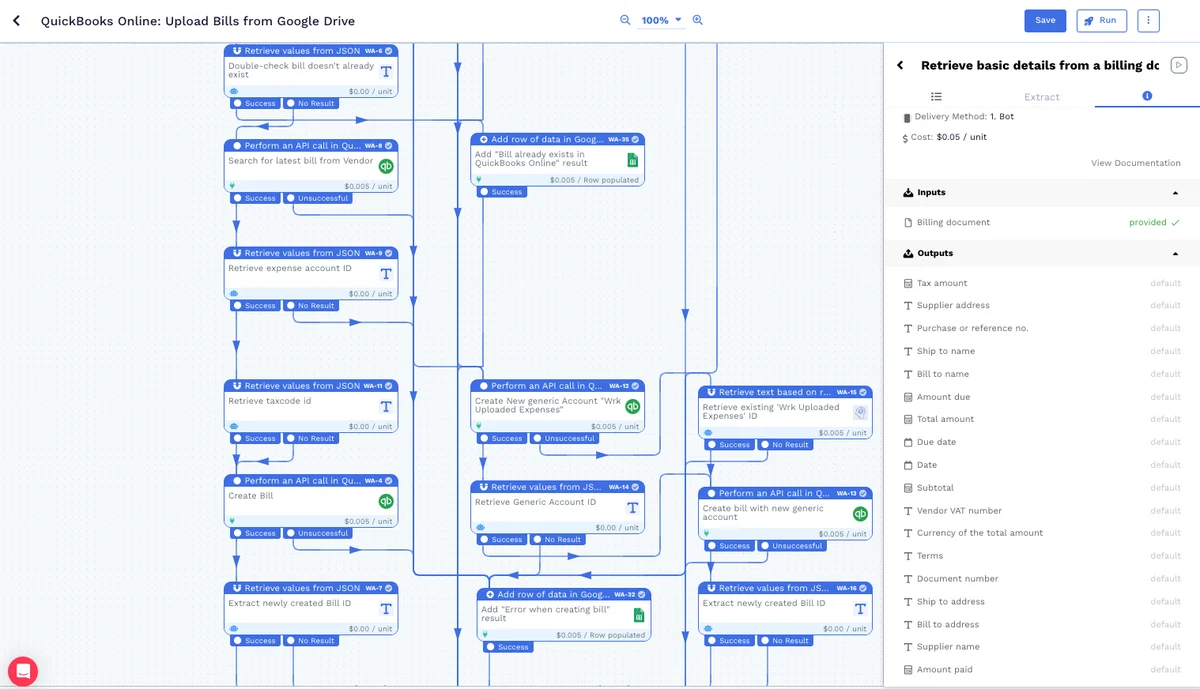
Extract Files: Automatically extracts all image and PDF files from the specified Google Drive Folder URL.
Retrieve File Details: For each file, it retrieves basic details for processing.
Vendor Search & Creation: Searches for each vendor in QuickBooks Online. If not found, the system will create a new vendor (if set to True) or send an email notification for missing vendors (if set to False).
Duplicate Check: Checks if the vendor already has a bill with the same Document number to avoid duplication.
Bill Logging: If no existing bill exists, the system will log a new bill with a generic expense account — if found, it will log with the expense account from the latest bill.
Spreadsheet Output: The Wrkflow provides a Google Sheet via the Launch Console containing URLs for all newly created bills.
Integrate it with your favourite apps








Explore more Wrkflows





Start Automating with Wrk
Kickstart your automation journey with the Wrk all-in-one automation platform